Watch
From idea to prompt in 15 seconds
Type a slash, pick a command, choose your tool, copy.
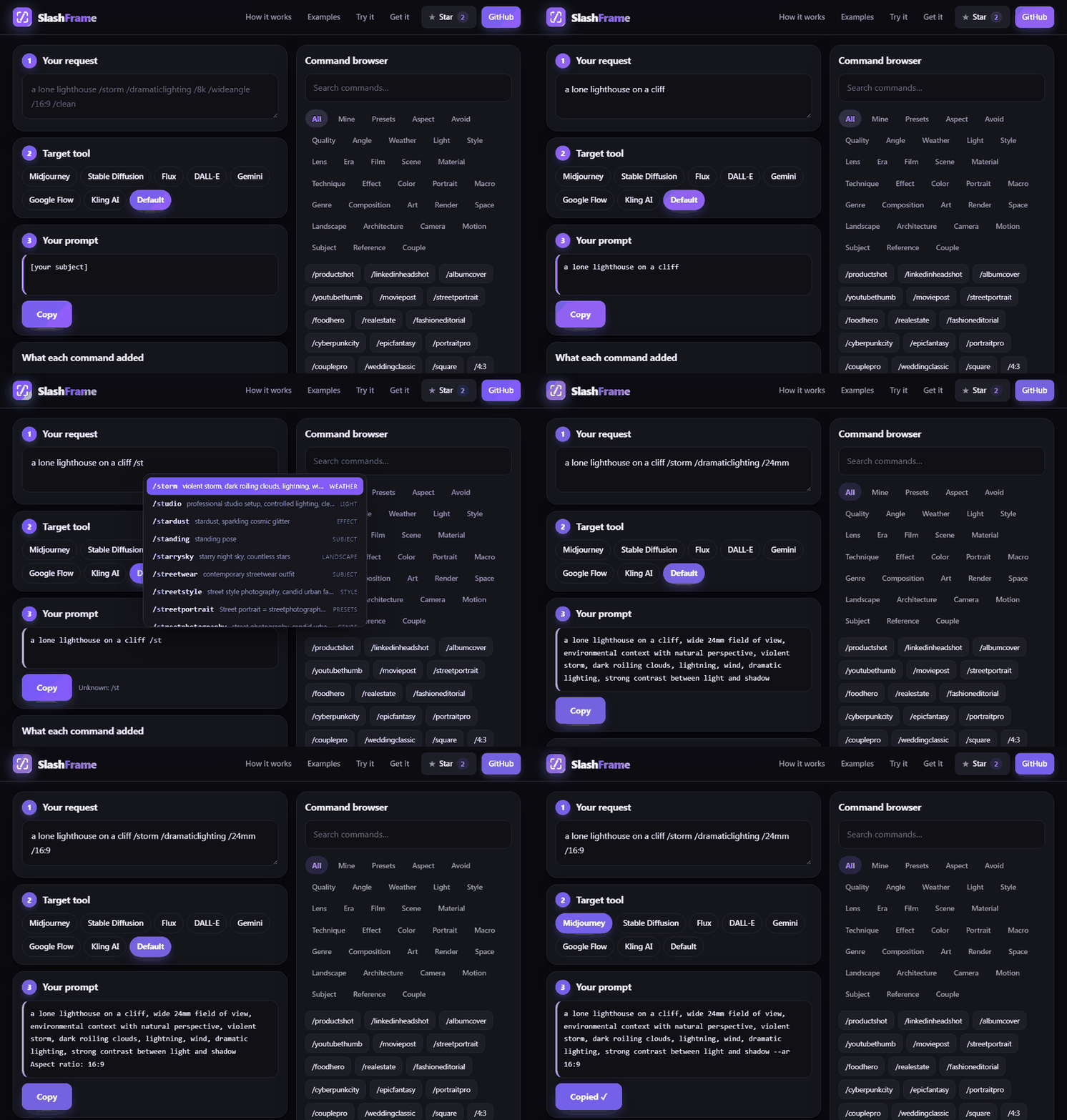
Type your idea and a few slash commands. SlashFrame writes the Prompt, a ready Negative prompt and the Size in the layout Stable Diffusion tools expect. Free, in your browser, no sign-up.
You type
You get (Stable Diffusion format)
How it works
You keep control of the idea. The commands add the camera, light and style wording that image tools respond to.
Say what you want, then add commands such as /goldenhour or /85mm. Plain words like "cinematic" work too.
Midjourney, Stable Diffusion, Flux, DALL-E, Gemini, Google Flow or Kling. The prompt is formatted the way that tool likes it.
One click copies the finished prompt, plus a negative prompt when your tool has one. A list shows what every command added.
Watch
Type a slash, pick a command, choose your tool, copy.
Examples
Drag the slider. The left side is the plain idea, the right side adds commands.
Try it
Everything below runs in your browser. Click commands on the right to add them.
Free prompt generators
Each tool wants a slightly different format. Pick yours and get the right one.
New to prompts? Read how to write AI image prompts, or browse the command cheat sheet.
Get it
The same commands work as a Claude skill and plugin, a ChatGPT GPT, a Gemini Gem, this web page, and ComfyUI nodes.
Install the plugin in two commands. (Its id is still image-style.)
claude plugin marketplace add geevarghesekthomas84-sys/image-style-skill
claude plugin install image-style@image-style-market
Prompt, upload and SVG nodes, plus ready workflows. Unzip into custom_nodes and restart.
ComfyUI-ImageStyle.zip
Ready-made files for a Custom GPT, a Gemini Gem and a Claude.ai skill upload. Steps are in the README.
dist/platforms/
At most 8 style modifiers, and when two commands clash the later one wins.
Every command is listed with the exact words it added, so you can learn what each does.
Save a set of commands as your own recipe, or copy a link that opens your exact request.
MIT licensed. Everything is on GitHub.
About
Stable Diffusion tools such as Automatic1111, Forge and ComfyUI take a prompt and a separate negative prompt, plus an image size. Keyword-style prompts with commas are the traditional format.
SlashFrame outputs three lines: Prompt:, Negative prompt: and Size:. The negative prompt starts with common basics (lowres, blurry, bad anatomy, watermark) and adds more when you use avoid-commands like /nodeform or /notext.
If you work in ComfyUI, the free SlashFrame nodes give you the positive prompt, negative prompt, width and height as separate outputs you can wire straight into your workflow.
You type:
a lone lighthouse on a cliff /storm /dramaticlighting /24mm /16:9 /clean
You get:
Prompt: a lone lighthouse on a cliff, wide 24mm field of view, environmental context with natural perspective, violent storm, dark roiling clouds, lightning, wind, dramatic lighting, strong contrast between light and shadow
Negative prompt: lowres, blurry, bad anatomy, watermark, text, watermark, logo, signature, caption, username
Size: 1344x768
Want a different tool? See all free prompt generators.
FAQ
Short answers about SlashFrame, the free AI image prompt generator.
Yes. Every result includes a negative prompt with the usual basics, and avoid-commands add more terms.
Yes. The keyword-style output suits SD 1.5, SDXL and Pony-style models. Check the size your model prefers and set a matching ratio command.
Yes. It is free and open source under the MIT license. There is no account, no sign-up and nothing to install to use the website.
It formats prompts for Midjourney, Stable Diffusion, Flux, DALL-E and ChatGPT, Gemini, Google Flow and Kling. It also ships as a Claude skill and plugin, ChatGPT and Gemini instruction packs, and ComfyUI nodes.
It is free and open source. If it saves you time, scan the code with your phone or tap the button to buy me a coffee. Thank you!
☕ Buy me a coffeeFree, open source, and works with the tools you already use.